GitHub
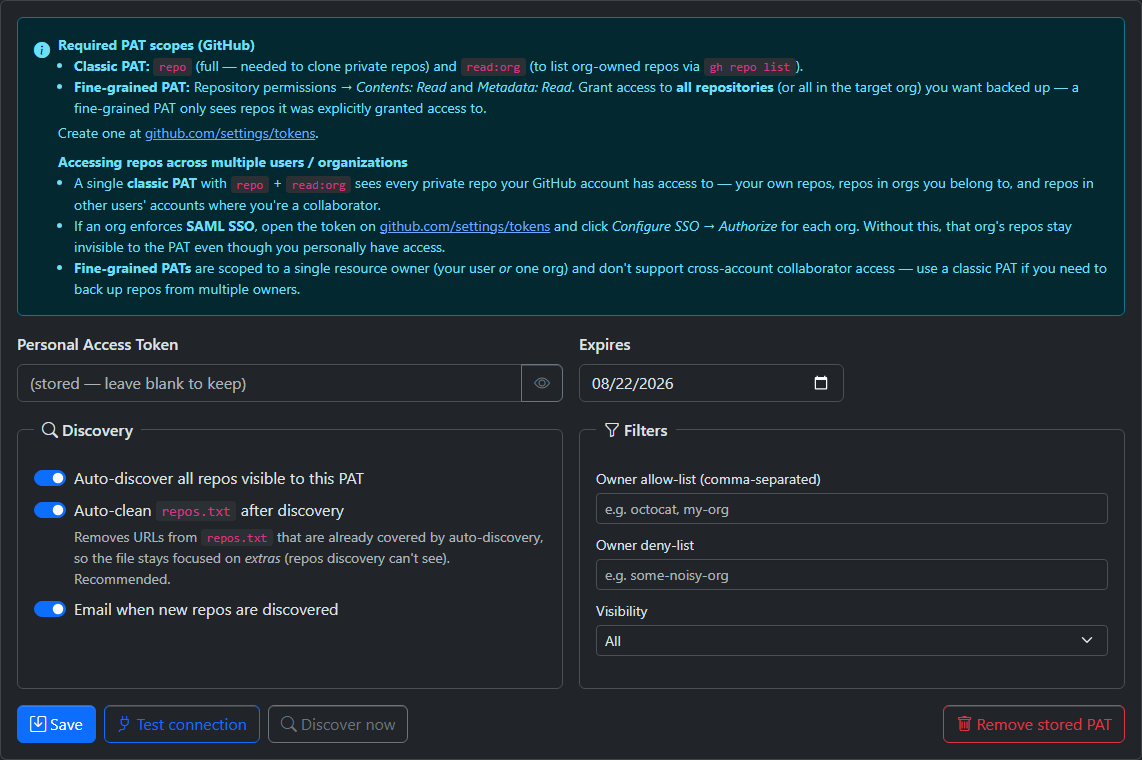
Creating the Token
GitEcho authenticates to GitHub with a Personal Access Token (PAT). You can use a classic or a fine-grained PAT.
- Go to https://github.com/settings/tokens → Generate new token → Generate new token (classic).
- Give it a name (e.g.
gitecho-backup) and an expiration date. - Select these scopes:
repo(full) — clone private repositoriesread:org— read org membership (used when accessing org-owned repos)
- Click Generate token and copy the value (shown only once).
- Paste it into Settings → Providers → GitHub in GitEcho and click Test connection.
Auto-discovery runs gh repo list, which returns the repositories owned by the authenticated user (including private ones). To back up repos owned by an organization or other users you collaborate with, pin them in repos.txt — the repo scope still lets the PAT clone them.
- Go to https://github.com/settings/tokens?type=beta → Generate new token.
- Set a name, expiration, and the Resource owner (your account or the org).
- Under Repository access, choose All repositories (or select the specific repos you want backed up).
- Under Permissions → Repository permissions, set:
- Contents: Read
- Metadata: Read (granted automatically)
- Click Generate token, copy it, and paste it into Settings → Providers → GitHub.
Warning
Fine-grained PATs are scoped to a single resource owner and don't support cross-account collaborator access. Use a classic PAT if you need to back up repos from multiple owners.
Required PAT Scopes
repo(full) — needed to clone private reposread:org— read org membership when accessing org-owned repos
Create at: https://github.com/settings/tokens
- Repository permissions → Contents: Read and Metadata: Read
- Grant access to all repositories (or all in the target org) you want backed up
Create at: https://github.com/settings/tokens?type=beta
SAML SSO
If an organization enforces SAML SSO:
- Open your token at https://github.com/settings/tokens
- Click Configure SSO → Authorize for each org
- Without this, the org's repos stay invisible to the PAT even though you personally have access
Auto-Discovery
The GitHub provider discovers the repositories owned by the configured PAT's account via gh repo list and merges them with repos.txt entries (deduplicated by URL). Repos owned by organizations or other accounts can be added via repos.txt.
To back up only a curated subset, use a fine-grained PAT scoped to those specific repos, or use the allow/deny list filters on the Settings → Providers page.
Configuration
Configure via Settings → Providers → GitHub:
- Enter your PAT
- Set the expiration date
- Click Test connection to verify
- Optionally configure discovery filters (allow/deny lists, visibility)